Built by SDRs for SDRs

OUT-DIAL
YOUR FELLOW SDR'S

The ultra-lean Chrome extension that strips away the lag between "New Lead" and "Ringing." Be the first to the dial, every single time.
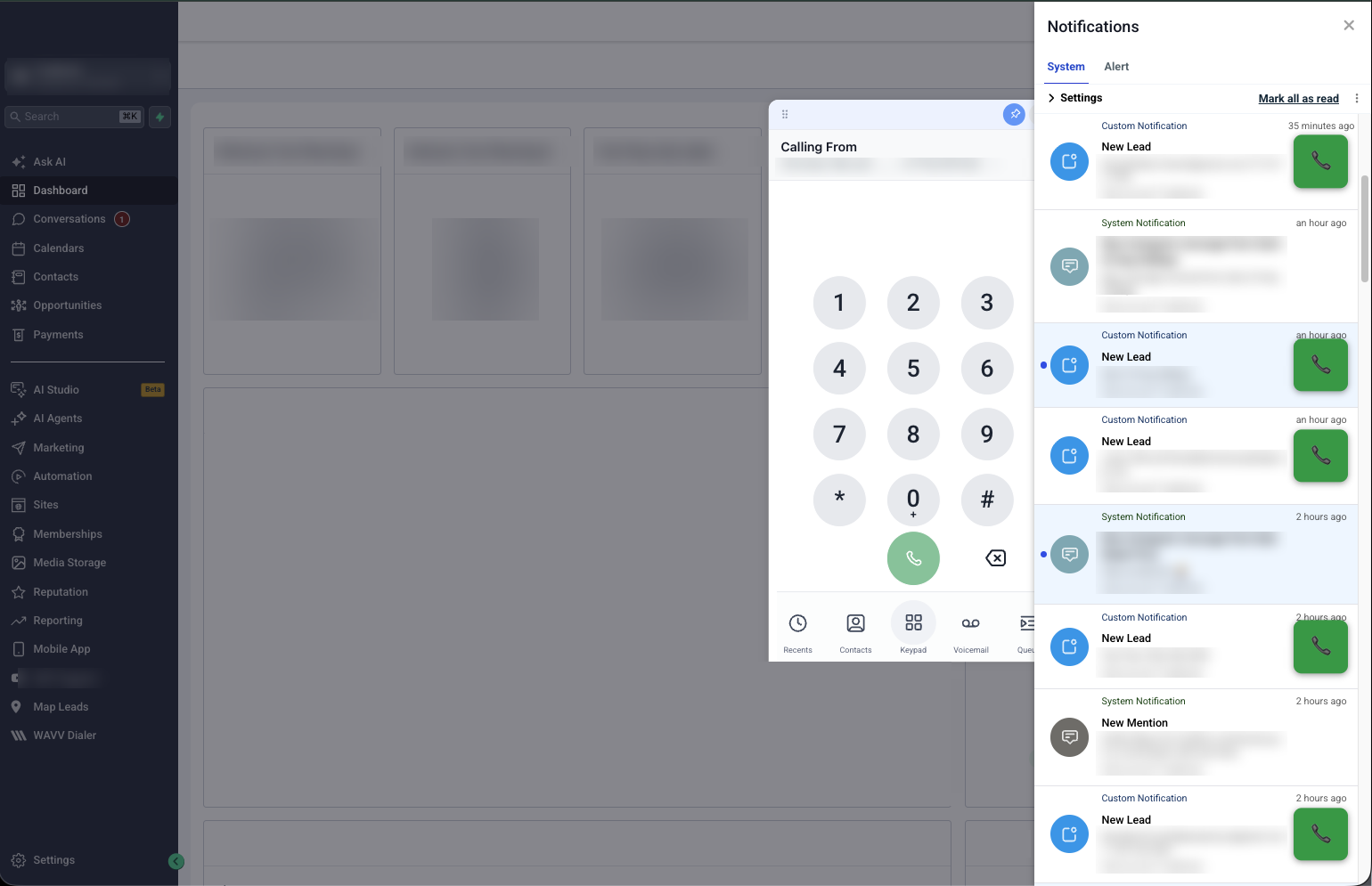
LeadSniper adding a green call button to new lead notifications inside a CRM
0.3s

Average Sync Latency

Pulls the number straight out of your GoHighLevel notification the moment it lands, and dials it through GoHighLevel's own dialer.

#1

Leaderboard Position

Stop losing high-intent inbound leads to the rep sitting two desks down from you.

chrome://extensions · leadsniper
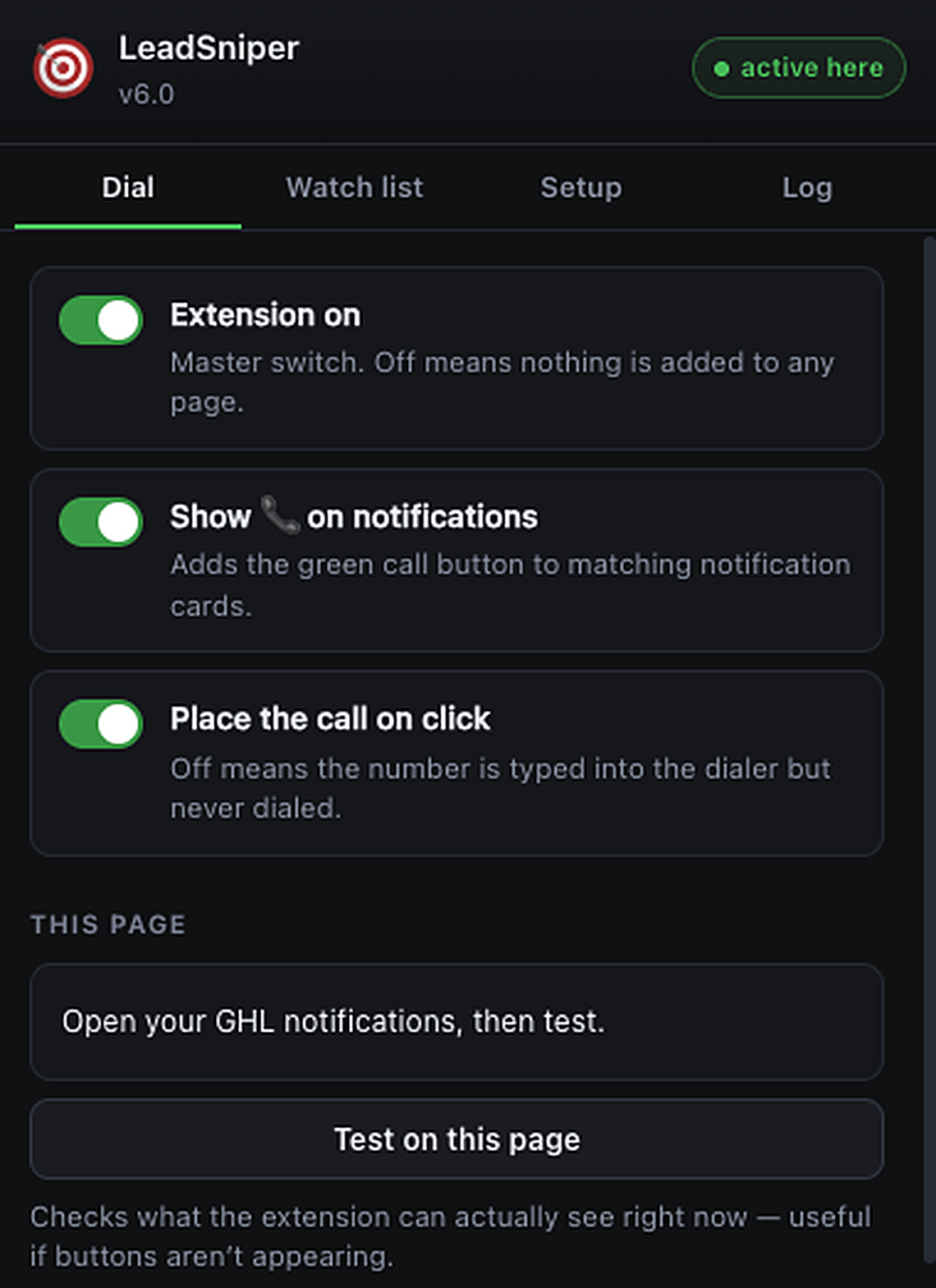
LeadSniper extension popup showing the dial toggles and page test

Three toggles. Zero setup.

FLIP IT ON. DIAL FIRST.

  • Extension on — one master switch, nothing touches your CRM when it's off.
  • Call button on notifications — a green dial button lands on every matching lead card.
  • Place the call on click — straight to ringing, or just pre-fill the dialer.
  • Pin your dialer open — keep the GoHighLevel dialer docked and open at all times. Critical: it's what makes the call connect instantly and the right number land, every time.

CRM support

Works with

GOHIGHLEVEL

GoHighLevel and GoHighLevel white-label domains — the dial button lands on every new-lead notification. No other CRM is supported today.

On the roadmap — not yet supported

SALESFORCEHUBSPOTOUTREACHSALESLOFTAPOLLO

None of these work today. Tell us which one you live in and we'll prioritise it.

Permissions, in plain English

YOUR LEADS NEVER LEAVE.

You're installing something that sits on top of your CRM, so here's exactly what it does and doesn't touch.

  • Runs only on your CRM tabs. No access to any other site, and nothing at all when the master toggle is off.
  • Lead data stays in the page. Names, numbers and emails are read to place the dial button — never sent to our servers or anyone else.
  • Settings stay on your machine. The three toggles live in local Chrome storage. Uninstalling wipes them.
  • No recordings, no tracking. No call audio, no browsing history, no keystrokes, no selling data. Read the full policy.

Pricing

ONE PLAN. NO TIERS.

$299/ month

Per seat, cancel anytime.

  • — Unlimited dials and notifications
  • — One-click calling on every new lead
  • — Free updates and new CRM support
  • — Direct support from an SDR who uses it daily
Install LeadSniper

QUESTIONS.

How do I install it?

Add it from the Chrome Web Store, pin it to your toolbar, open the popup and flip the master toggle on. Refresh your CRM tab and the green dial buttons appear on new-lead notifications. Setup takes under a minute — no admin approval, no CRM integration to configure.

Can my manager or CRM admin see that I'm using it?

LeadSniper runs locally in your browser and doesn't write anything back to the CRM, so there's no record of it in your CRM's audit log. Note that some companies manage Chrome extensions centrally — if your IT team enforces an extension allowlist, they'll see it there.

Is this against company policy?

That's your call to make. LeadSniper doesn't scrape, export or move data anywhere — it just saves you the clicks between seeing a lead and dialing it. If your company restricts browser extensions, check with them first.

Does it work with my dialer?

It uses GoHighLevel's own built-in dialer. You can also set it to just pre-fill the number instead of placing the call, so you can copy it into whatever tool you use.

What happens to my lead data?

It stays in your browser. LeadSniper reads the phone number on the page to build the dial button and sends nothing to our servers. No names, no numbers, no call recordings.

Which CRMs are supported?

GoHighLevel only, including GoHighLevel white-label domains. No other CRM is supported today. Salesforce, HubSpot, Outreach, Salesloft and Apollo are on the roadmap — email us and we'll bump yours up the list.

Can I cancel?

Anytime, no contract. Your seat runs to the end of the billing period and then stops.